Symphony: A Color Font That Brings Your Designs to Life
There’s a moment in every design project where you realize the standard palette just isn’t cutting it. You’ve chosen your imagery, laid out your text, and selected a font family you love, but the final result feels flat. It lacks that spark, that energy that makes a viewer stop scrolling and actually pay attention. This is where the conversation usually turns to color fonts, and more specifically, to a typeface like Symphony.
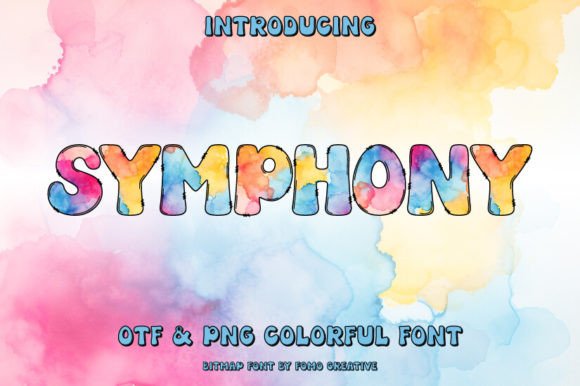
Symphony isn’t just another typeface sitting in your font folder; it’s a visual asset that bridges the gap between typography and illustration. By definition, it is an OpenType-SVG font. If you aren’t deep in the weeds of font engineering, all you really need to know is that this technology allows the font file to contain color information, gradients, and transparency directly within the vector data. Unlike a traditional serif or sans serif font that requires you to manually apply a gradient overlay in your design software, Symphony arrives ready to go. The characters are pre-rendered with rich, multidimensional effects—think watercolor washes, metallic sheens, or vibrant bursts of color that shift and flow.
Why Multidimensional Typography Matters for Modern Brands
For the small business owner or the creative entrepreneur, standing out is the primary objective. We live in a visual economy where Instagram feeds, Etsy listings, and website headers are crowded with competing messages. Using a premium font like Symphony changes the dynamics of that competition. It offers an immediate "wow" factor that static text simply cannot achieve.
Consider the concept of brand recognition. When a customer sees a logo or a header that utilizes a unique, colorful typeface, it lodges in their memory differently than standard text. Symphony allows you to infuse your brand identity with a specific mood without needing complex graphic design skills. Whether you are aiming for something bright and energetic for a youth-focused brand or something elegant and mysterious for a luxury product, the gradient and shading effects embedded in the font do the heavy lifting.
However, the appeal isn't just about looking pretty. It’s about visual consistency. Because the color effects are built into the glyph, every time you type a letter, the specific gradient and shadow remain consistent. You don't have to worry about one letter having a slightly different opacity than another because you forgot which layer style you used previously. This reliability is crucial for maintaining a professional presentation across various marketing assets.
Practical Applications: Where Symphony Shines
The versatility of a color font is often underestimated. While it is undeniably a display font—meaning it is best suited for headlines, logos, and short bursts of text rather than long paragraphs of body copy—its applications are vast. If you are a crafter, a graphic designer, or a content creator, here is where Symphony can elevate your work:
- Social Media Graphics: On platforms like Instagram and Pinterest, visual noise is high. A heading written in Symphony can act as the focal point of a quote card or an announcement, grabbing attention faster than a standard bold sans serif. It adds a layer of depth that makes the graphic feel "finished."
- Logo Design: For brands that want to convey creativity, playfulness, or luxury, using a color font for the logotype can be a game-changer. It provides a distinct personality that helps define the brand's voice immediately.
- Packaging and Merchandise: If you are selling physical products, packaging is your silent salesperson. Symphony can be used on labels, hang tags, or stickers to make the product feel high-end or artisanal. It works beautifully on merchandise like T-shirts or tote bags where a single color print might feel too minimal.
- Invitations and Greeting Cards: Whether it’s a wedding invitation or a birthday flyer, the event industry thrives on aesthetics. The intricate details of a color font add a touch of elegance and excitement that sets the tone for the event before a single word of the copy is read.
- Editorial Layouts and Blogs: While you wouldn't use it for your main article text, using Symphony for drop caps or pull quotes in a magazine layout or a blog post can break up the monotony of the page and guide the reader's eye.
Mastering the Art of Font Pairing
One of the most common mistakes designers make with display or script fonts is overusing them. Because Symphony is rich in visual detail—containing gradients, shadows, or textures—it demands breathing room. If you use it for every line of text, the design will become cluttered and difficult to read.
The key to working with this creative font is font pairing. You need a "supporting actor" to let Symphony be the star. A clean, geometric sans serif font usually works best here. Think of fonts like Montserrat, Open Sans, or Helvetica. The simplicity of the sans serif provides a neutral backdrop that allows the colorful details of Symphony to pop without competing for attention.
When testing your pairings, pay close attention to readability. Because color fonts use transparency and gradients, they can sometimes be harder to read against complex backgrounds. Always test your text against your intended background image or color. Ensure there is enough contrast. If the background is busy, consider placing a solid shape or a semi-transparent overlay behind the Symphony text to ensure the message is legible.
Technical Considerations and Workflow Integration
Adopting new design assets always comes with a learning curve, and it is important to understand the technical limitations and requirements of the product you are purchasing. Symphony is delivered as an OpenType-SVG font. This is a modern standard, but it does require specific software to function correctly.
It is fully compatible with industry-standard design software including Adobe Photoshop, Adobe Illustrator, Silhouette, and Inkscape. If you are creating digital products, social media posts, or print-ready PDFs, these tools will render the font exactly as intended, preserving the color and transparency data.
A Critical Note for Crafters: If you are using a Cricut machine, you need to be aware that standard OTF and TTF files for color fonts are not compatible with Cricut Design Space in the same way. Cricut software often struggles to interpret the embedded color data of SVG fonts, usually defaulting to a single color or outlining the shapes incorrectly. If you are a crafter relying on Cricut, you may need to use the font within a vector program like Illustrator or Silhouette, create your text design there, and then import the result as a flattened image or SVG shape into your cutting software.
For a deeper dive into how to manage these files, especially if you are new to modern typography formats, it is highly recommended to review the Ultimate Font Guide provided by the creator. It outlines the specific steps for installing and using these files to ensure you don't run into compatibility roadblocks.
Strategic Use for Marketing and Branding
From a marketing perspective, typography is a tool for persuasion. The font you choose signals your brand's personality before the customer reads a single word. A handwritten font might suggest intimacy; a bold serif might suggest authority. Symphony, with its inherent color and flair, suggests creativity, attention to detail, and a willingness to stand out.
For digital products and web design, using a font like this can increase audience engagement. A vibrant header on a landing page can reduce bounce rates by immediately capturing interest. It turns a standard webpage into an experience.
However, be mindful of commercial licensing. If you are using this font for a client project or for merchandise that you intend to sell, ensure your license covers commercial use. Most premium fonts allow for this, but it is always the professional's responsibility to verify the terms to protect their business and their clients.
Ultimately, Symphony is more than just a collection of letters; it is a design solution. It solves the problem of visual monotony and offers a way to inject personality and artistry into your work. By integrating it thoughtfully into your projects—balancing its complexity with simple companions and respecting its technical requirements—you can transform standard layouts into compelling visual narratives.