Get a Little Goopy: Unleashing the Yuck Font for Bold Designs
Sometimes, a project demands more than just clean lines and polite spacing. It needs a bit of attitude. It needs to feel tactile, visceral, and maybe even a little bit gross. If you have ever found yourself scrolling through hundreds of sans serif options looking for something that actually pops off the screen, you know the struggle. We are conditioned to look for "professional" fonts, but in a crowded market, "professional" often translates to "boring." For designers, marketers, and creators who want to make an immediate visual impact—whether it is for a Halloween campaign, a children’s brand with a bit of edge, or a retro throwback design—you need a typeface that commands attention. That is where the Yuck font steps in.
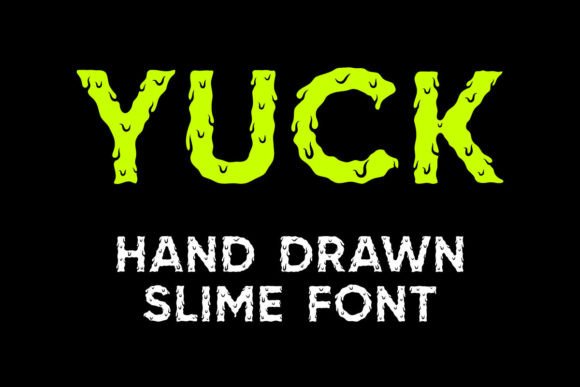
Yuck is not your standard display typeface. It is a hand-drawn slime font that brings a distinct, tactile quality to your typography. It captures the essence of something melty, goopy, and wet. Visually, it mimics the look of slime oozing down a surface, making it an instant conversation starter. But beyond the novelty factor, Yuck is a versatile tool for specific branding and design applications. It comes as a package deal, offering two distinct versions: a vibrant color font and a clean outline font. This duality allows for creative flexibility, letting you decide whether you want the full, colorful impact of dripping slime or the structural intrigue of a hollow, outlined character.
More Than Just a Gimmick: Practical Applications
While the name suggests something messy, using Yuck in your projects is actually a very calculated design decision. It is about aligning your typography with your message. A premium font like this shines brightest when used for specific purposes where personality outweighs strict corporate formality. Think about the visual language of the entertainment industry, the toy market, or even edgy streetwear brands. These sectors rely on typography that feels alive and textured.
Here are a few practical ways to deploy the Yuck typeface effectively:
- Logo Design and Branding: If you are launching a brand that targets a younger demographic or focuses on entertainment, gaming, or party supplies, Yuck can form the backbone of your logo. It immediately communicates fun and irreverence.
- Packaging Design: Imagine this font on a wrapper for sour candy, a jar of green goo for a science kit, or a novelty product. The visual texture of the font pre-empts the customer's sensory experience of the product.
- Event Invitations: Birthday parties, especially for kids and teens, or Halloween events require invitations that set the mood instantly. Yuck serves as a fantastic headline font to grab parents' and kids' attention right out of the envelope.
- Social Media Graphics: On platforms like Instagram or TikTok, you have milliseconds to stop the scroll. Using a bold, textured display font like Yuck for your headlines can drastically increase engagement rates for specific campaigns.
- Merchandise: T-shirts, stickers, and posters often rely on bold typography. The "melty" aesthetic of Yuck works incredibly well for merchandise that leans into pop culture, horror-comedy, or playful sarcasm.
Understanding the Two Versions: Color vs. Outline
When you download Yuck, you are getting more than just a single file. The package includes two distinct styles, and understanding the difference is key to using them correctly.
The Color Font is the showstopper. It features the pre-rendered slime texture, usually with gradients and highlights that make the letters look three-dimensional and wet. This is perfect for digital design assets, web design headers, and high-resolution print materials where you want maximum visual impact without having to manually add effects in your design software. However, it is important to note the compatibility requirements. The color version is optimized for design programs like Adobe Photoshop, Illustrator, Silhouette, and Inkscape. It is not compatible with Cricut Design Space for cutting purposes.
The Outline Font offers a different vibe. It retains the irregular, hand-drawn shape of the letters but removes the internal color fill. This creates a hollow effect that is excellent for layering. You can fill the outline with different patterns, colors, or textures yourself. Crucially, the black version of this font is compatible with Cricut Design Space and other cutting machines. This makes it a vital asset for crafters who use vinyl cutters to create decals, t-shirts, and home decor. If you are a hobbyist or small business owner selling handmade goods, the outline version ensures you can still utilize the unique shape of Yuck on physical products.
Pairing Yuck with Other Typefaces
One of the biggest mistakes designers make when using a bold display font is trying to use it for everything. Yuck is a high-impact typeface; it is meant for headlines, logos, and short bursts of text. Using it for body copy would be a readability disaster. Therefore, successful typography here relies on smart font pairing.
You need a secondary font to do the heavy lifting for paragraphs, descriptions, and details. The goal is to find a typeface that complements the personality of Yuck without competing with it.
- Pair with a Clean Sans Serif: A geometric sans serif font provides a neutral, modern backdrop that allows the slime texture of Yuck to stand out. The contrast between the organic, messy shape of Yuck and the rigid geometry of a sans serif creates a balanced visual hierarchy.
- Try a Rounded Sans Serif: If you want to maintain a friendly, approachable vibe (perhaps for a toy brand), pairing Yuck with a softer, rounded sans serif can bridge the gap between the "messy" headline and the clean body text.
- Use a Simple Script (with caution): For invitations or party flyers, a very legible, casual script font can work for sub-headers, but ensure it doesn't look too formal or cursive. The vibe should remain playful.
Always test your pairings. Type out a mock-up of your layout. Does the body text disappear? Does the headline scream too loud? The Yuck font is a strong flavor, so it needs to be balanced with something milder.
Readability and Visual Hierarchy
When working with a textured, hand-drawn font like Yuck, readability is your primary concern. Because the letters have irregular edges and "drip" effects, legibility can decrease at small sizes. Here are a few tips to ensure your message gets across:
- Size Matters: Keep Yuck large. It is designed to be viewed at sizes where the details of the slime texture are visible. If you shrink it down to 12pt, it will likely look like a blurry mess rather than a stylistic choice.
- Spacing is Key: Hand-drawn fonts often have tighter default kerning (spacing between letters) than standard fonts. You may need to manually adjust the tracking to ensure the letters don't bleed into one another, especially if you are using the outline version.
- Contrast: Ensure there is sufficient contrast between the font and the background. If you are using the color version, be mindful of placing green slime text on a green background. High contrast ensures the "goopy" details remain visible.
Commercial Licensing and Cutting Machines
For entrepreneurs and small business owners, the legal side of design assets is just as important as the visual side. Before incorporating Yuck into a product you intend to sell, you must verify the licensing terms included with the purchase. Typically, premium fonts come with a license that allows for commercial use, but there may be limits on the number of users or specific use cases (like print-on-demand).
Furthermore, the distinction between the Color and Outline versions regarding cutting machines cannot be overstated. If you run a business making custom decals or heat transfers using a Cricut machine, you must use the outline version. The software cannot process the complex color data of the font file for cutting paths. By sticking to the outline version, you ensure a clean cut and a professional finish on your physical products. Always check the Ultimate Font Guide or the manufacturer's FAQ if you are unsure about software compatibility.
Injecting Personality into Your Projects
Ultimately, design is about communication. The fonts you choose tell a story before the viewer even reads the words. Choosing a font like Yuck tells your audience that you are not afraid to be different. It suggests a brand that is playful, perhaps a little rebellious, and definitely memorable.
Whether you are designing a digital product, a flyer for a local event, or branding a new startup, the tools you use define the result. By integrating a unique, hand-drawn slime font into your toolkit, you open up possibilities for designs that feel authentic and engaging. It moves your work away from the sterile, corporate look and injects a dose of reality—and fun—into the visual landscape. So, if your next project needs a bit of texture and a lot of attitude, getting a little "yucky" might be the best design decision you make.